
Download xRar – Free RAR Decompressor for Windows, Mac & Android
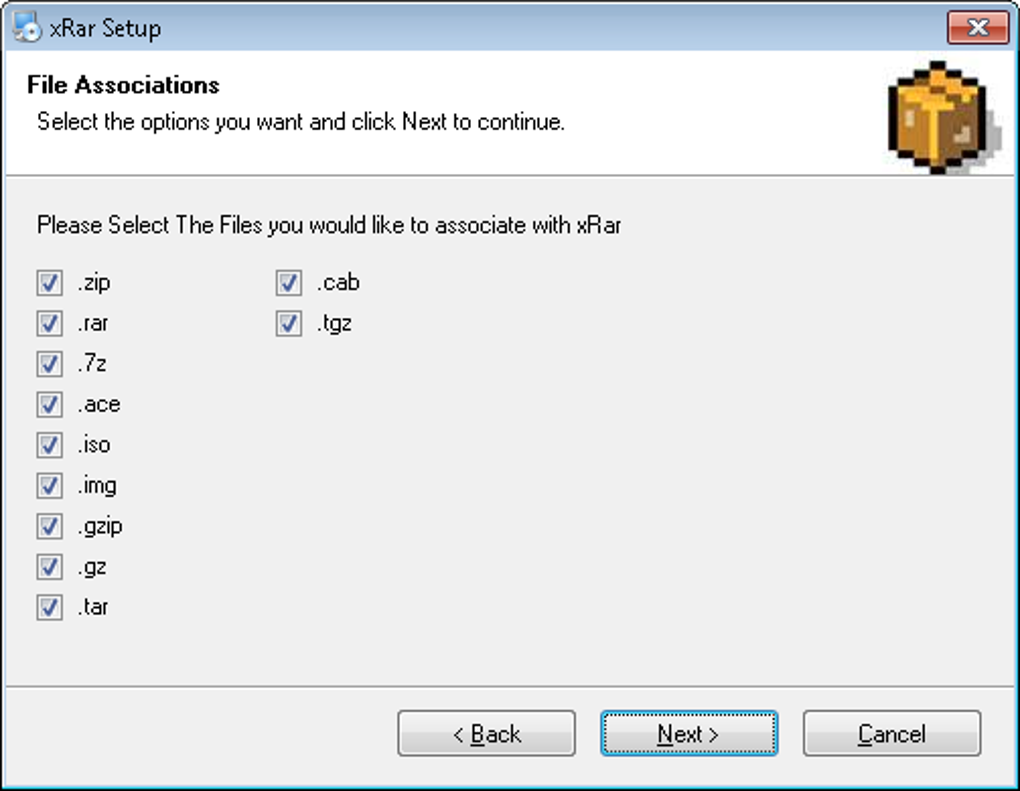
Looking for a simple, secure, and fast way to open and extract RAR, ZIP, 7Z, and other compressed files? xRar is a lightweight, free compression tool that supports multiple archive formats including RAR, ZIP, 7Z, ACE, ISO, IMG, GZIP, GZ, TAR, TGZ, and CAB. Designed with simplicity in mind, xRar allows users to extract files quickly without overwhelming them with complex settings.
Whether you're a student, professional, or casual user, this tool offers a hassle-free experience for managing compressed files. With support for password-protected archives and the ability to create new ZIP files—including self-extracting and encrypted ones—xRar delivers essential functionality without bloat. It’s an excellent alternative to heavier software like WinRAR, especially for those who value speed and ease of use.
Available for Windows, Mac, and Android, xRar ensures cross-platform compatibility and seamless file management. Download xRar today and enjoy a reliable, secure, and free solution for all your archive needs.
Key Features of xRar – Simple, Secure, and Fast
One of the standout reasons why xRar has gained popularity among users is its focus on core functionality without unnecessary complexity. Unlike feature-heavy compression tools, xRar streamlines the user experience by offering only essential features, making it ideal for those who want to extract files quickly without learning a steep interface. The software supports a wide range of archive formats, including RAR, ZIP, 7Z, ACE, ISO, IMG, GZIP, GZ, TAR, TGZ, and CAB—ensuring compatibility with nearly every compressed file you might encounter. This versatility means you can open and extract files from various sources, whether they’re software installers, document bundles, or media collections.
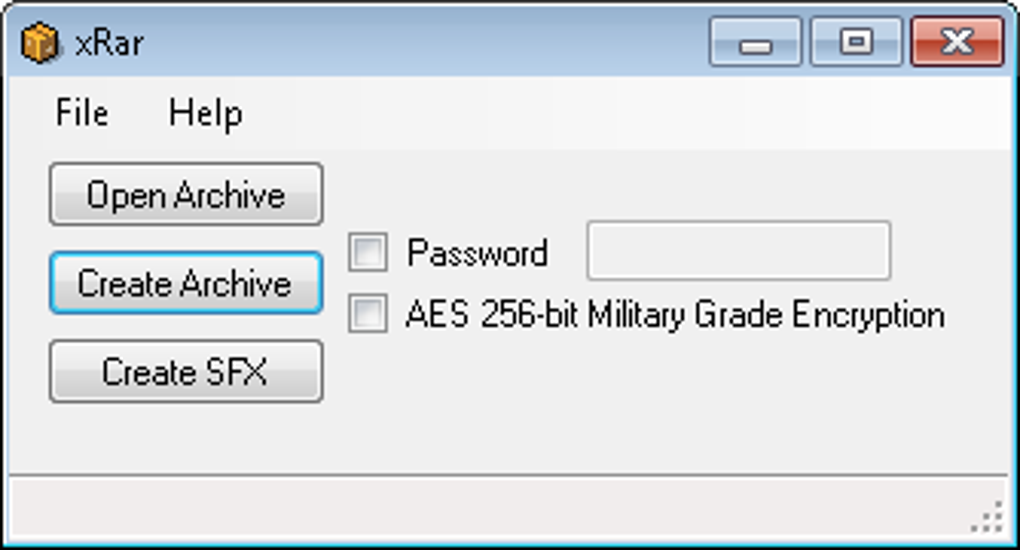
Another major advantage is its support for password-protected archives. xRar allows users to extract files from encrypted archives by simply entering the correct password, ensuring your sensitive data remains secure. Additionally, it enables you to create new ZIP archives, including self-extracting (SFX) and password-protected versions, which is perfect for sharing files securely. The tool also integrates smoothly with the Windows context menu, so you can right-click any archive and extract it instantly—no need to launch the app manually.
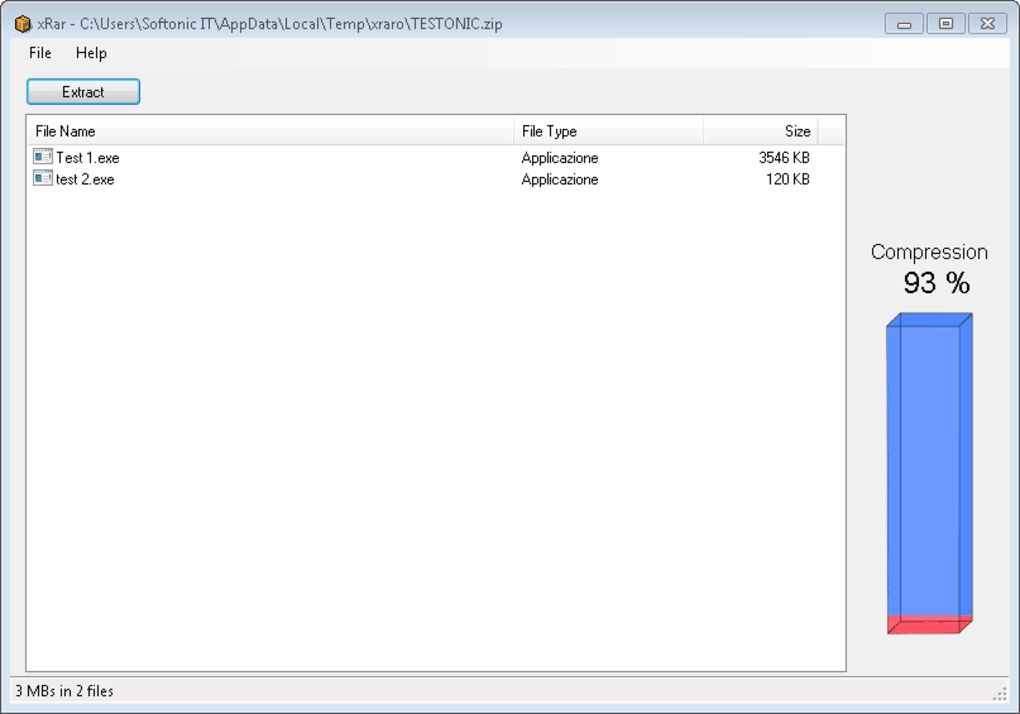
The interface displays the compression level of each archive, giving you a quick insight into how much space was saved during compression. With minimal resource usage and fast performance, xRar runs efficiently on older systems and modern devices alike. Whether you're working on a low-end laptop or a high-speed desktop, xRar delivers consistent results without lag or crashes.
How to Install and Use xRar on Windows, Mac, and Android
Installing xRar is a breeze, thanks to its lightweight design and straightforward setup process. For Windows users, simply visit the official website, download the installer (usually a .exe file), and run it. The installation wizard guides you through the process in seconds—no complicated steps, no bundled adware. Once installed, you can launch the app from the Start menu or use the context menu integration by right-clicking any archive file and selecting “Extract with xRar.” This seamless integration saves time and enhances usability, especially when dealing with multiple files.
On Mac, the process is equally simple. Download the .dmg file from the official site, open it, and drag the xRar application into your Applications folder. After installation, you can access it from the Launchpad or Spotlight.
The Mac version maintains the same intuitive interface and supports all major archive formats. For Android users, xRar is available on the Google Play Store. Search for “xRar,” download the app, and install it directly from your device.
The mobile version is optimized for touchscreens, allowing you to browse, extract, and manage archives with just a few taps. You can even create new ZIP files on your phone and share them via messaging apps or cloud storage.
Using xRar is intuitive: just open the app, click “Add” to select an archive, enter a password if required, and click “Extract.” You can choose the destination folder and start the process instantly. For creating archives, select the files you want to compress, choose ZIP format, and set options like password protection or SFX creation. The entire workflow is designed for speed and simplicity, making it perfect for users of all skill levels.
Compatibility: Works Across Windows, Mac, and Android
One of xRar’s biggest strengths is its cross-platform availability. Whether you’re using a Windows PC, Mac computer, or Android smartphone, you can rely on xRar to handle your compressed files without compatibility issues. This makes it a truly versatile tool for users who switch between devices or work in multi-device environments. The software is optimized for each platform, ensuring smooth performance and consistent behavior across systems.
On Windows, xRar supports Windows 7 and later, including Windows 10 and Windows 11. It runs efficiently on both 32-bit and 64-bit systems, consuming minimal RAM and CPU resources. For Mac users, the app is compatible with macOS 10.13 (High Sierra) and later, ensuring support for modern Apple hardware.
The Mac version integrates well with Finder and supports drag-and-drop extraction, enhancing productivity. On Android, xRar is compatible with devices running Android 5.0 (Lollipop) and above, making it accessible to a wide range of smartphones and tablets. The mobile app supports offline extraction, so you can open archives even without an internet connection.
Moreover, xRar maintains a consistent user experience across platforms. The interface remains clean and intuitive, with the same core features available on all devices. This uniformity is especially beneficial for users who manage files across multiple devices. Whether you’re extracting a ZIP file on your laptop at work, viewing a RAR archive on your tablet during a commute, or creating a secure archive on your phone, xRar delivers reliable performance every time. Its ability to handle complex formats like ISO and CAB ensures that you’re not limited to common file types—making it a go-to tool for both everyday and advanced users.
Pros and Cons of Using xRar
- Pros:
- Free to download and use with no hidden costs
- Lightweight and fast, ideal for older or low-spec devices
- Supports a wide range of archive formats (RAR, ZIP, 7Z, ISO, CAB, TAR, and more)
- Simple, intuitive interface with minimal learning curve
- Context menu integration for quick extraction on Windows
- Can create password-protected and self-extracting ZIP archives
- Available for Windows, Mac, and Android—true cross-platform support
- Secure handling of encrypted archives
- Cons:
- Limited advanced features compared to full-featured tools like WinRAR or 7-Zip
- No built-in cloud integration or file preview functionality
- Doesn’t support creating RAR archives (only extracting)
- Occasional update delays on some platforms
- Limited customization options for compression settings
Frequently Asked Questions (FAQ)
Is xRar free to use?
Yes, xRar is completely free to download and use. There are no subscription fees or premium features locked behind paywalls. The software is available for Windows, Mac, and Android at no cost.
Can xRar open RAR files?
Absolutely. xRar supports RAR archives and can extract files from them without any issues. It’s a reliable alternative for users who need to open RAR files without installing heavy software.
Does xRar support password-protected archives?
Yes, xRar can extract files from password-protected RAR, ZIP, and other archive formats. You’ll need to enter the correct password during extraction.
Can I create ZIP files with xRar?
Yes, xRar allows you to create new ZIP archives. You can also set passwords and generate self-extracting (SFX) archives for easy sharing.
Is xRar safe to download?
Yes, xRar is safe to download from the official website. It does not contain malware, adware, or bundled software. Always download from trusted sources to ensure security.
Final Verdict: Why You Should Download xRar Today
If you’re searching for a reliable, free, and secure tool to handle compressed files, xRar is an excellent choice. It delivers core functionality—extracting and creating archives—without the clutter of unnecessary features. Its lightweight design ensures fast performance on any device, while cross-platform support means you can manage your files seamlessly across Windows, Mac, and Android. Whether you’re extracting a ZIP file for a school project, opening a RAR archive from a colleague, or creating a secure backup, xRar makes the process simple and efficient.
While it lacks some advanced options found in tools like WinRAR or 7-Zip, its simplicity is its greatest strength. For users who prioritize speed, ease of use, and security, xRar stands out as a top-tier free compression tool. With regular updates and strong community support, it continues to evolve while staying true to its minimalist philosophy.
Download xRar now and experience a faster, cleaner way to manage your archives. It’s free, secure, and ready to use—perfect for everyone from beginners to power users.







